XTrem Kernel : my Own RTOS for ARM Cortex M3
14 July 2016
Tasks, priorities, semaphores, mutexes and a little shell, written from scratch for the mbed LPC1768
I wrote XTrem Kernel in 2015 and it has been sitting on my hard drive since then, so I just put it on GitHub : ronangaillard/xtremkernel.
I wanted to know what really happens inside a real time operating system, and the best way to know was to write one. In less than two months I wrote a multitask kernel for ARM Cortex M3 processors : thousands of lines of low level C and a few hundred lines of assembly. It runs on the NXP LPC17XX chips, so on the original mbed LPC1768 board.
The kernel
A SysTick interrupt every millisecond gives the kernel its heartbeat. The scheduler keeps one queue of runnable tasks per priority level, always runs the highest priority one, and does round robin between tasks of the same priority.
The context switch itself is a few lines of assembly in the PendSV handler, the lowest priority interrupt of the Cortex M3 : it saves the registers of the current task on its stack, switches the stack pointer, and restores the registers of the next one. The Cortex M3 port of TNKernel was a great help to understand how to do it.
On top of that the kernel provides what you expect from an RTOS :
- tasks with priorities, created with their own stack, and
sleep() - timers and timeouts
- semaphores
- mutexes, with priority inheritance : when a high priority task waits for a mutex, the task holding it temporarily gets its priority, so it can’t be blocked by a medium priority task
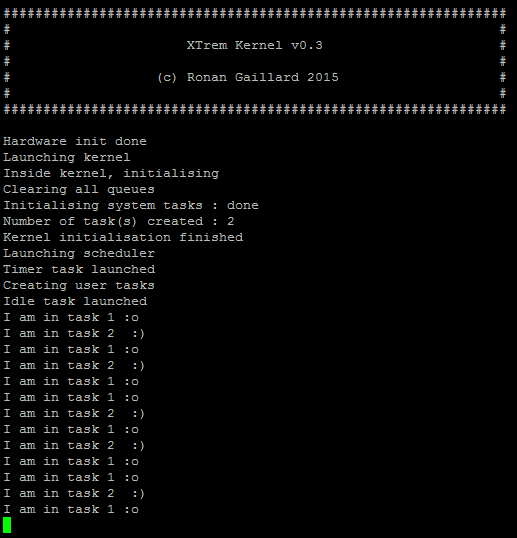
The screenshot above is the classic first test : two tasks printing on the serial port, task 1 more often than task 2.
A small computer
Once the kernel worked, I wanted to use it for something. So I added :
- a basic shell (
ls,mount,whoami,reboot…) - a PS/2 keyboard driver
- a VGA output through a Gameduino board on the SPI bus, with an 8x8 font
- SD card support, with the FatFs module to read files and navigate in folders
With the keyboard and the screen, the mbed became a small standalone computer, running my own OS.
The next steps were to load binaries from the SD card and run them as tasks, and to move the shell and the FAT support out of the kernel and load them as modules, UNIX style. The hardware specific code is well separated from the kernel core, so porting it to other ARM processors should be easy too.