
Factory DS: a Factorio-like on a 67 MHz Nintendo DS
Or how I ended up building a factory game for a 2004 handheld with 4 MB of RAM, with a lot of help from Claude Code
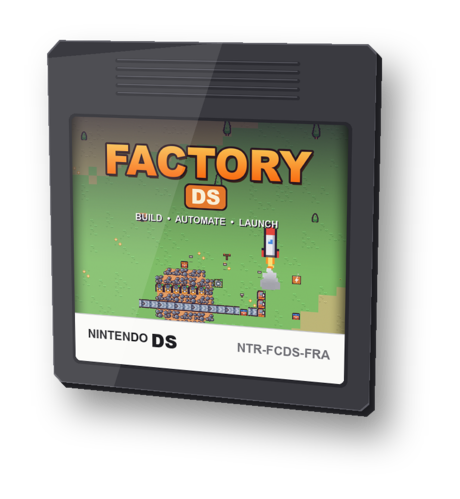
Yes, I even made a game card for it. No, it’s not for sale.
Download Factory DS (factory-ds.nds, 1.9 MB, in English and French). It runs on a real DS with a flashcart, or in an emulator like melonDS.
Why the Nintendo DS?
I think the Nintendo DS is one of the best consoles ever made. It’s far from the most powerful, but I find it one of the best designed. Two screens, a real d-pad, four buttons and two shoulder buttons, and everything falls right under your thumbs. It’s a clamshell, so you can throw it in a backpack without being afraid of breaking it, and it’s simple: you open it and you play, you close it and it sleeps. And of course there is some nostalgia, I spent a lot of hours on it as a teenager.
The problem is that I had run out of games that really kept me hooked on it. The DS library is huge and I have played a lot of great games on it, but the games I spend my evenings on today are more “modern” ones, and none of them exist on the DS.
So I started wondering, why not the other way around? Why not bring a modern game to the DS? The first one that came to my mind was Factorio, the one I play way too much. If you don’t know it, you land on a planet and build a factory: drills mine the ore, conveyor belts carry it everywhere, robotic arms (called inserters) move items in and out of machines, and you spend your time fixing bottlenecks and optimizing ratios. It’s a game about systems more than graphics, so it should fit on a 2004 console, right?
Getting started on a console I had never touched
I had never written a single line of code for the DS. I didn’t know the SDKs, the memory map or how the screens work. So I did what I do now for most of my side projects: I opened Claude Code and started from there.
The first evening was only about the setup. We looked at the options together and I went for BlocksDS, a modern SDK built on top of libnds (the historical C library to talk to the DS hardware). I didn’t want to install an ARM toolchain on my Mac, so I asked Claude to make everything run in a Docker container:
docker run --rm -v "$PWD":/work -w /work skylyrac/blocksds:slim-latest make
You get a .nds file, you open it in the melonDS emulator, and that’s it. A blank screen, but a blank screen that compiles!
Before going further I read a bit about the hardware, because I knew it would drive a lot of decisions later:
| Nintendo DS | |
|---|---|
| Main CPU | ARM946E-S at 67 MHz, with no division instruction! |
| RAM | 4 MB |
| Fast memory (ITCM) | 32 KB for code, much faster than the main RAM |
| Screens | 2 × 256×192 |
| Saves | a small save chip in the cartridge, or files on the SD card of a flashcart (the cartridge you use to run homebrew games) |
The first specs
Then I wrote the first specs of the game. Nothing fancy, just a short list:
- a 2D world seen from above, with biomes (grass, forest, lakes, desert, snow)
- wood, stone, iron, copper and coal to mine by hand
- a player who walks around with the d-pad, with a cursor in front of him
- the world on the top screen and the interface on the bottom one
- drills, furnaces, belts and inserters, and that’s all for a start
- everything playable without the stylus
For the graphics I picked the CC0 Kenney tilesets (Tiny Town and Tiny Factory). They are 16×16 pixels, which is exactly the right size for a 256×192 screen, and they still look good that small.
I also decided to draw everything as a bitmap, where each pixel is one byte pointing to a palette of 256 colors, instead of using the tile engine of the DS. The tile engine is the classic way to make a 2D game on this console, but I wanted to be free to draw whatever I wanted: items sliding on belts, inserter arms rotating, smoke, and later trains. I think it was the right call, even if it’s also where most of the performance problems came from.
The very first build was just colored squares. A red square for the drill, grey rectangles for the belts, orange dots for the items and some debug text on the bottom screen. It was ugly, but the belts were moving and that was enough to keep me going. Then real tiles came in, then a mini-map, then objectives… Here is how it evolved:
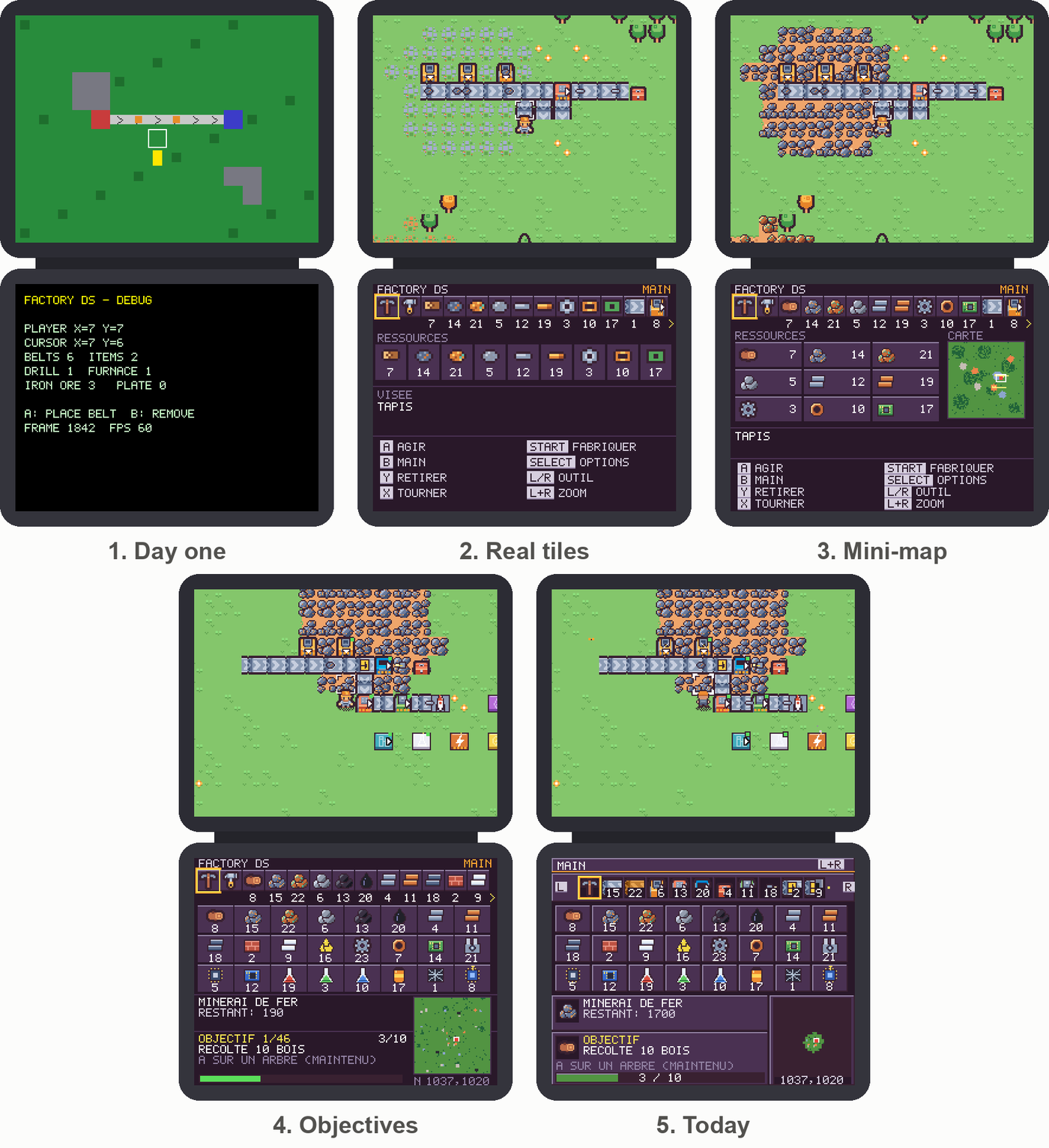
From colored squares to the current version. These screenshots are in French, but the game is now also in English.
A world that does not fit in memory
Next I wanted a big world, the kind of world where you have to build trains to bring oil from far away. I set the target to 2048 × 2048 tiles, which is 4.2 million tiles. Even with one byte per tile, that’s already the whole RAM of the console.
Just asking for “a bigger map” would have ended with a giant array and a crash, so Claude and I spent an evening on the design first, going back and forth until it fit. We ended up with this:
- the terrain is not stored at all. Any tile is computed when needed from its coordinates, with a hash function and some value noise (a smooth kind of random) that decide where the forests, lakes, ore patches, deserts and snow are
- only what the player changes is stored, in a hash table of modified tiles (an ore patch you mined, a tree you cut)
- buildings live in a pool indexed by position, with another hash table
- the save file only contains the differences with the generated world, in a compact format (6 bytes per belt)
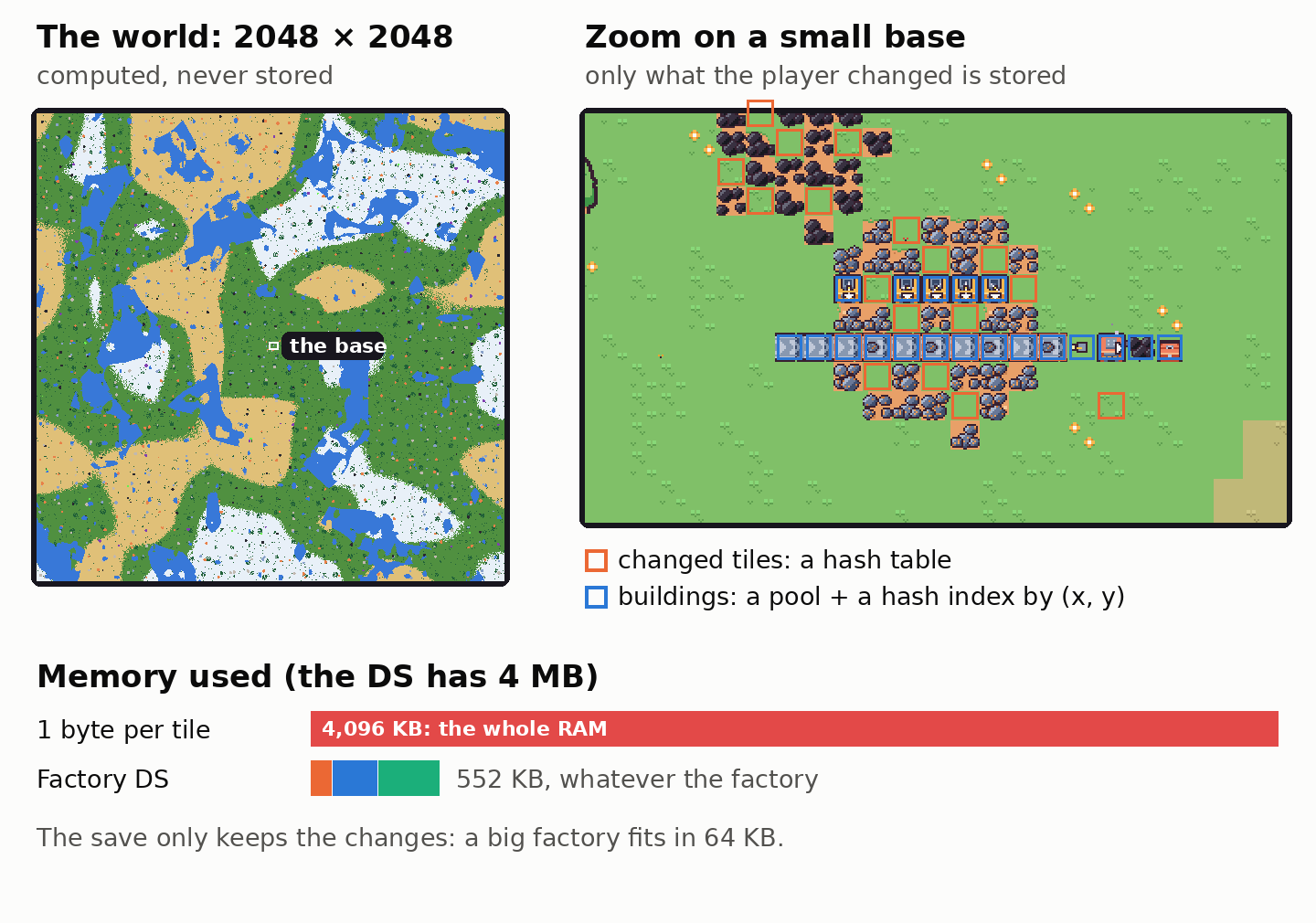
On the left, the real generated world, all of it (one pixel is 4×4 tiles). On the right, a small base. Only the tiles the player changed (orange) and the buildings (blue) take memory.
Claude wrote the code and it worked as I hoped. A save slot is 64 KB, there are 3 of them (3 files on the SD card with a flashcart), and a big factory fits in one.
I still wanted to know what happens when it doesn’t fit.
In RAM, it can’t overflow. Every table is allocated once when the game starts, with a fixed size: room for 12,288 modified tiles and 12,288 buildings, 552 KB in total. There is no malloc anywhere in the game. When a table is full the game just refuses, with “too many buildings” when you try to place one more or “map saturated” when you try to cut one more tree. It doesn’t crash.
The save is another story. A building takes between 5 bytes (a rail) and 23 bytes (a machine with its state), a modified tile takes 6 bytes, and a slot is 64 KB. So I measured real saves of bigger and bigger factories:
| Factory | Save size |
|---|---|
| The biggest save made by the test agents | under 8 KB |
| 820 buildings | 19 KB |
| 1,830 buildings | 34 KB |
| 2,840 buildings | 50 KB |
| around 3,500 buildings | doesn’t fit anymore |
So no, it’s not guaranteed, and a player could build a factory too big to be saved. If that happens the game refuses to save and shows a message. The save is built in memory before anything is written, so the previous save is still there. You can’t save the latest version of your factory, but at least you don’t lose the old one.
I decided to stop there for now. Placing 3,500 buildings one by one with a d-pad is quite extreme, and the biggest saves made by the test agents are 8 times smaller than the limit. If someone ever gets there, I could compress the save or warn the player before the limit.
Machines, recipes and ratios
With the engine in place, the real game design could start, and it’s probably the part I enjoyed the most. I wrote down the machines, the recipes and their ratios. How many seconds for an iron plate, how many furnaces to feed one assembler, how much coal a steam engine burns… Then came the tiers:
- electricity, with generators, steam engines, solar panels, batteries and finally a nuclear reactor
- oil, with pumpjacks, pipes, refineries, plastic, sulfur and rocket fuel
- science packs, labs and a research tree of 16 technologies, with recipes locked behind research
- trains (more on them below)
- logistic drones that carry items between chests
- a rocket silo, around 50 objectives to guide you from the first wooden log to space, and an infinite research to keep going after the rocket
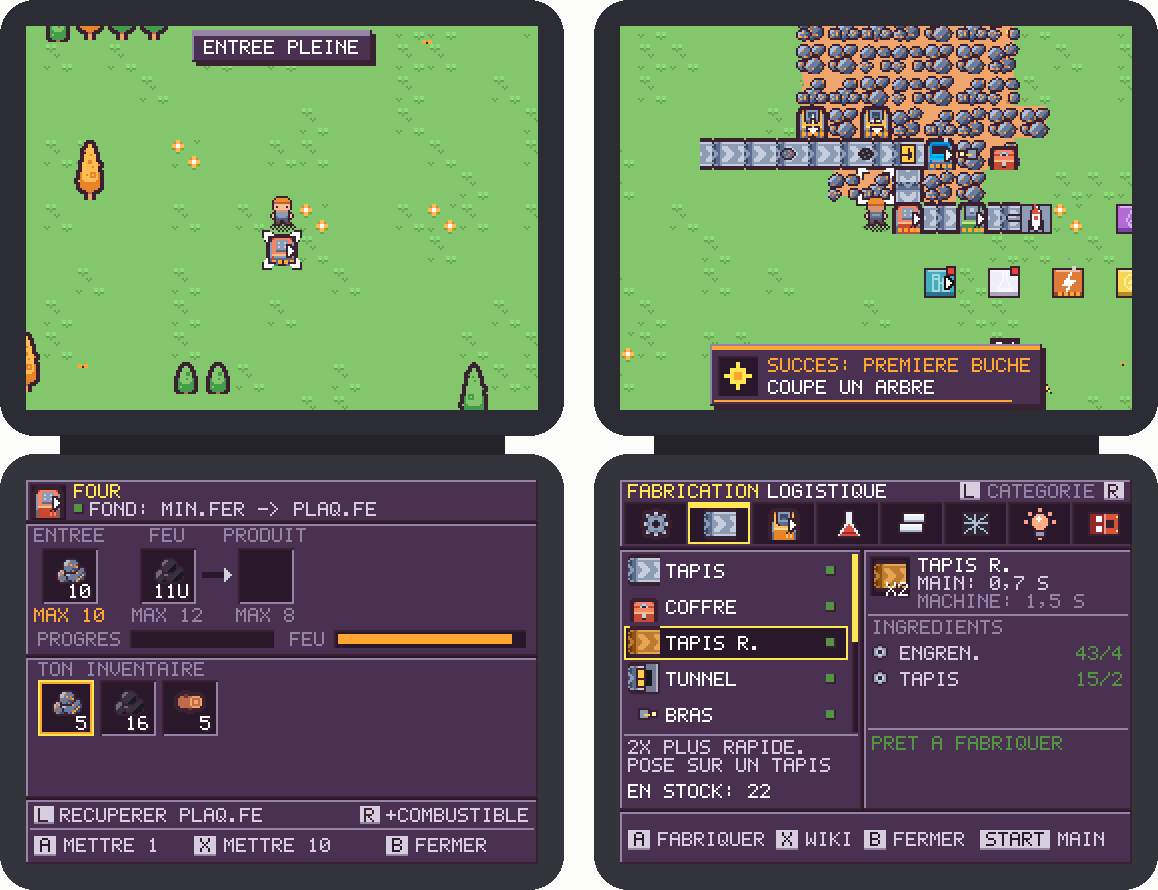
On the left the panel of a furnace, on the right the crafting menu.
Power grids and pipes
Electricity and fluids can get very expensive in a factory game. If you simulate the current going through every cable, or the water moving from one pipe to the next, a 67 MHz CPU gives up quickly. So for these the game doesn’t think in buildings, it thinks in networks.
For electricity the rules are quite simple. Two power nodes (poles, generators, solar panels and batteries) within 7 tiles of each other are linked automatically, there is no cable to pull. A pole powers the machines up to 3 tiles around it, and a generator up to 6. Twice per second each network compares what it produces with what its machines need, and the batteries charge or discharge the difference. If there isn’t enough power, every machine in the network slows down by the same amount. At 70%, everything runs at 70% speed, like in Factorio.
The expensive part is figuring out who is connected to whom, so it only runs when the factory changes. The nodes are sorted by x, so each one is only compared with the next ones up to 7 columns away. The groups are merged with a union-find, a classic little algorithm where each group points to a “leader” and merging two groups just means changing one pointer. The cables you see on screen are only the links that joined two groups, so you don’t get a spaghetti of wires. Step by step:
Fluids work the same way. A pipe network is one single tank. Its capacity is the sum of all its pipes and tanks, and it holds one amount of fluid. A pump adds to it, a machine takes from it, and nothing actually flows from one pipe to the next. When you cut or connect a pipe, each piece first gets back its share of the old network (in proportion to its capacity), then the networks are rebuilt and their shares added up. Only the fluid that was inside the removed pipe is lost, and as long as the pipes don’t change it costs nothing. Here is what happens when you connect and cut pipes:
All aboard
If you have played Factorio you know the moment. Your factory is running, the ore patch next to it is almost empty and the next one is far away. You place your first rails, your first station, your first locomotive, and that’s when the game gets really good. So a Factorio-like without trains was not an option for me.
They were also the hardest feature to get right. I wanted real trains and not just a cart on a rail:
- rails, stations and locomotives that you place by hand, with up to three wagons behind each locomotive (cargo wagons for items, tank wagons for oil)
- wagons that really follow the locomotive. Each train remembers its last positions, every 2 pixels, and the wagons are drawn along that path, so they bend in the turns exactly like the locomotive did
- schedules with up to four stops, and a condition for each stop: wait 8 seconds, wait until full, wait until empty or refuel. Inserters next to a station load and unload the wagons. The classic “iron mine full, then smelter empty, then coal station” loop works! At every junction the train looks for its way to the next station with a breadth-first search on the rail network, in a buffer of fixed size, so even a big network can’t make it run out of memory
- block signals. A signal cuts the track into blocks and only one train is allowed in each block. When a train passes a signal the next block is reserved and the light turns red for the others. Trains also keep a safety distance of two tiles, so they never run into each other
- and you can ride them! Press A next to a locomotive and you hop in, and the camera follows the train across the map
Getting several trains to share a network without deadlocks took a lot of evenings and a lot of scripted test sessions. I had two trains face to face on the same track, each one politely waiting for the other forever (now one of them backs off after a while), trains without a path because a rail was rotated the wrong way, and a train save format that had to change three times… But once it worked, I could watch three trains share the same loop, stop at the red lights and wait for their turn for ten minutes.
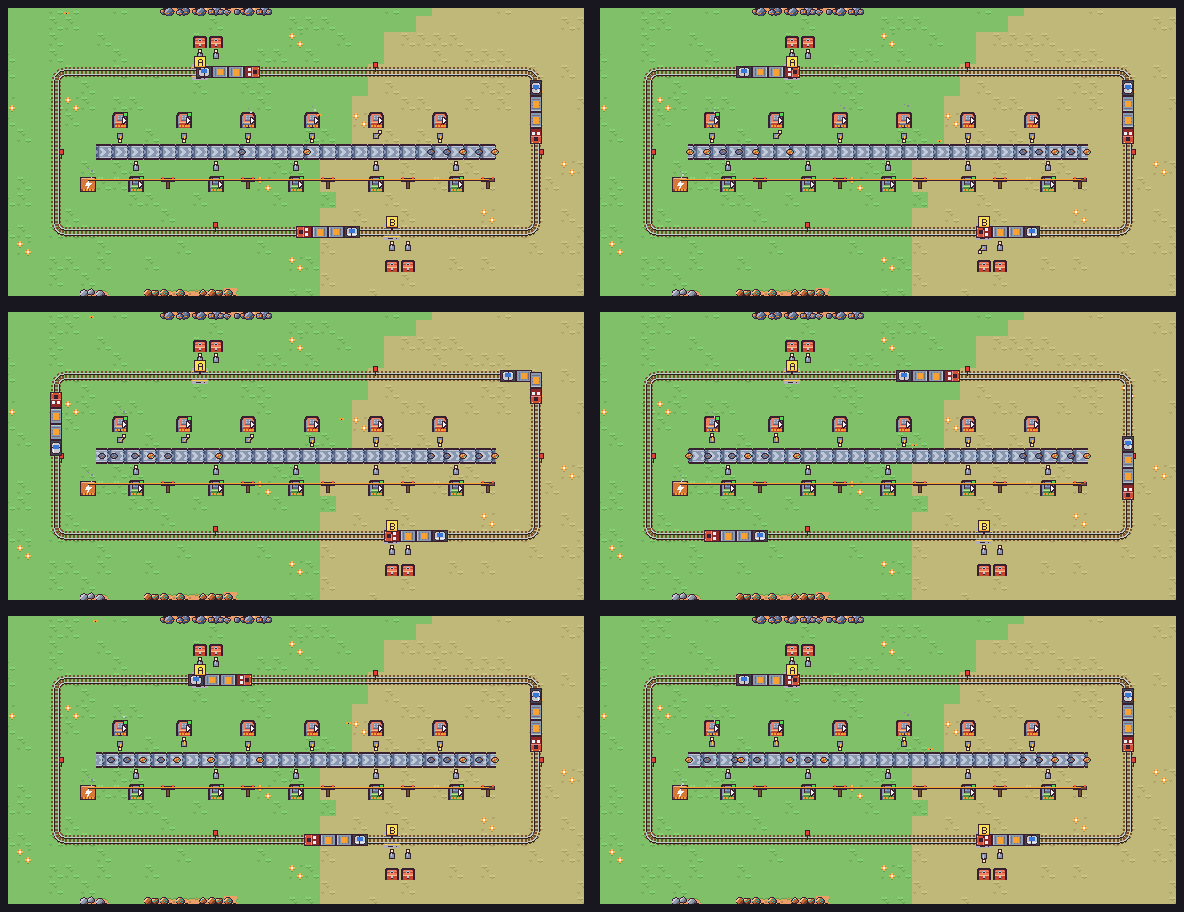
Three trains with cargo and tank wagons on the same loop. The little red flags are block signals, a train waits until the block in front of it is free. Captured from the game itself, at 30 fps.
Wires, clocks and logic gates
The other thing Factorio players love is automation that thinks by itself, like “stop the drills when the chest is full” or “only let the train leave when the wagons are loaded”. I didn’t want to go as far as the Factorio circuit network, with numbers on every wire, so I went for something closer to Minecraft redstone, with on/off signals only.
There are sources (a lever, a button that sends a 2-second pulse, a clock that switches every 1, 2, 4 or 8 seconds, and a sensor that watches a belt, a chest, a machine or a station), wires that carry the signal from tile to tile, and NOT, AND and delay gates. Chain a few delays and you get timers. At the end of the chain, a machine next to a signal pauses, a lamp turns on, a belt gate opens, or a station keeps its train at the platform.
With that you can build the classic “sensor on the chest, the drills stop when it’s full”, or keep a train at the station until a sensor says the chest next to it is empty.
The simulation runs every 4 frames, in three passes. First every source and every gate computes its new output from the state of the previous pass. Then the wires are flooded from the active sources with a breadth-first search. And finally each building reads the signal of its neighbors. Because the gates only look at the previous state, a loop of gates can’t get the game stuck in an infinite loop, it just oscillates like in real electronics. And if you haven’t placed a single logic piece, the whole thing is skipped.
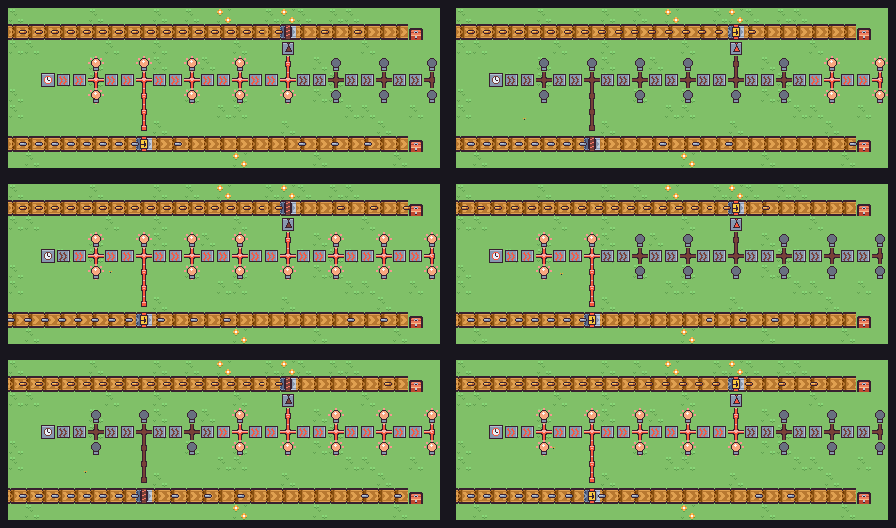
A clock switches on and off every 2 seconds and the signal travels through a chain of delays, so the lamps light up one after the other. The vertical wire on the left opens the gate of the bottom belt while the wave passes, and the plates pile up behind it the rest of the time. The top belt is behind a NOT gate, so its copper plates go through when the bottom gate is closed.
Testing (and balancing) a DS game without a DS
Testing was a problem from the very beginning. Every time Claude wanted to check something, an emulator window popped up on my screen. And I had no way to know if a change broke something three hours of play later.
So I asked Claude to prepare an environment where an agent could test the game on its own, by building it locally on my Mac and running it headless (without any window). The game now also compiles for macOS, against a tiny fake version of libnds. Instead of drawing on a screen, it writes PNG files of both screens. On top of that, a small text interface lets the agent drive the real game code with commands like press A, hold RIGHT 30, step 600, shot factory.png or state.
With that, play sessions become text files that can be replayed after every change. We ended up with around 470 of them, from “cut a tree” to “build a train network with signals”. They all run with the compiler’s sanitizers turned on, which stop the game as soon as it reads the wrong memory or does something undefined in C. And since Claude can play the game and look at the screenshots, it can check its own work before telling me it’s done.
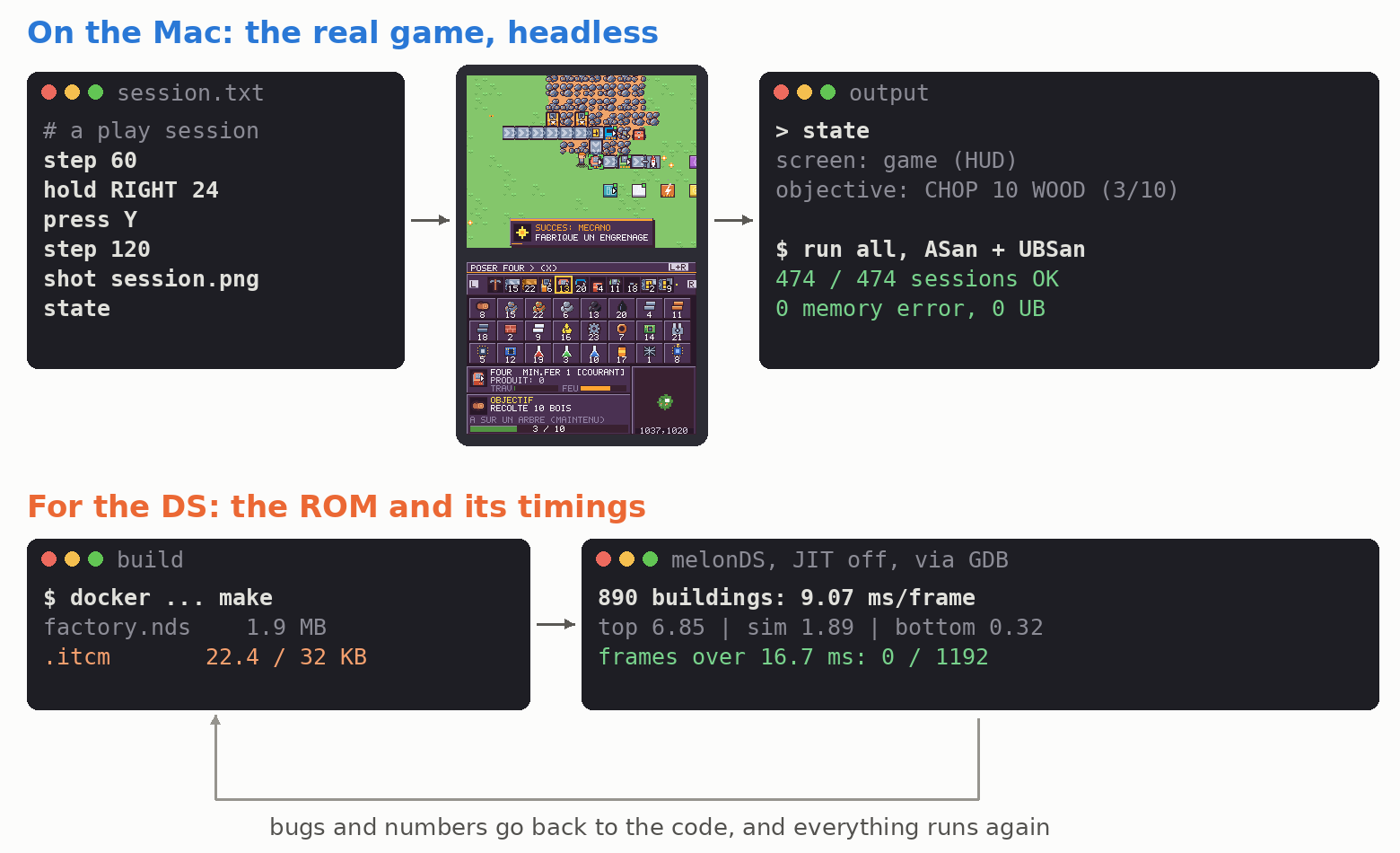
A real session: the script, the screenshot it produced, and the state of the game it printed.
Some bugs were really sneaky. My favorite one: if the game auto-saved during the 8 seconds of the rocket countdown, the silo stayed full forever and the game could never be finished. The odds were around 2.7% per rocket. In another one, a pumpjack connected to a full pipe network kept its last barrel of oil waiting to be pushed out, and never pumped again. Without the scripted sessions I would have found these after hours of play, or never.
The same setup gave me an idea for the balancing. Instead of playing 10 hours after every change in the ratios, I asked Claude to launch several agents that play the game through the text interface, each one on a different part of it. One played the beginning (the first 15 objectives) with the real buttons, without any cheat, and timed every objective. Another one measured the production rates of the mid- and late-game factories, a third one played the end game up to the rocket, and a last one tested the infinite research. There was also an “analyst” that read the code to list every rate and recipe, and computed how long the whole game would take. At the end each agent wrote a report about where it got stuck, how long each step took and what was too slow or too fast.
Then I read the reports and decided what to change. Cheaper labs here, a shorter objective there, an oil patch closer to the start… The agents play badly, and where they get stuck a new player probably will too.
Hitting the performance wall
Then my first big factory arrived, and it could not hold 60 frames per second. Walking around stuttered. A 67 MHz CPU is not much when you want to simulate thousands of machines and redraw a full screen 60 times per second.
Before changing anything I wanted numbers, but printf does not go anywhere on a DS! So I asked for a benchmark mode in the game. It loads several test factories and writes its timings into a buffer in RAM, and a small Python script reads that buffer through the debugger connection of melonDS (its GDB stub). melonDS runs in the background with the sound off and its JIT disabled (the JIT makes the emulator faster by translating the DS code for my Mac, but then the timings mean nothing). melonDS is very accurate, but it’s still an emulator, and I’ll come back to that at the end.
Then we went through the problems one by one. Measure, fix the worst one, measure again.
The ground. Redrawing the whole ground every frame was way too slow. The DS video hardware can stack several layers and scroll each of them by itself, so I split the top screen into two layers. A large 512×256 ground layer lives in video memory, and only the new tiles entering the view are drawn into it. The hardware scrolls it during the vertical blank (the short pause between two frames when the screen is not being drawn), so scrolling is free. Buildings, items and the player are drawn on a second layer on top, where color 0 is transparent. This alone removed more than 5 ms per frame and the stuttering disappeared.
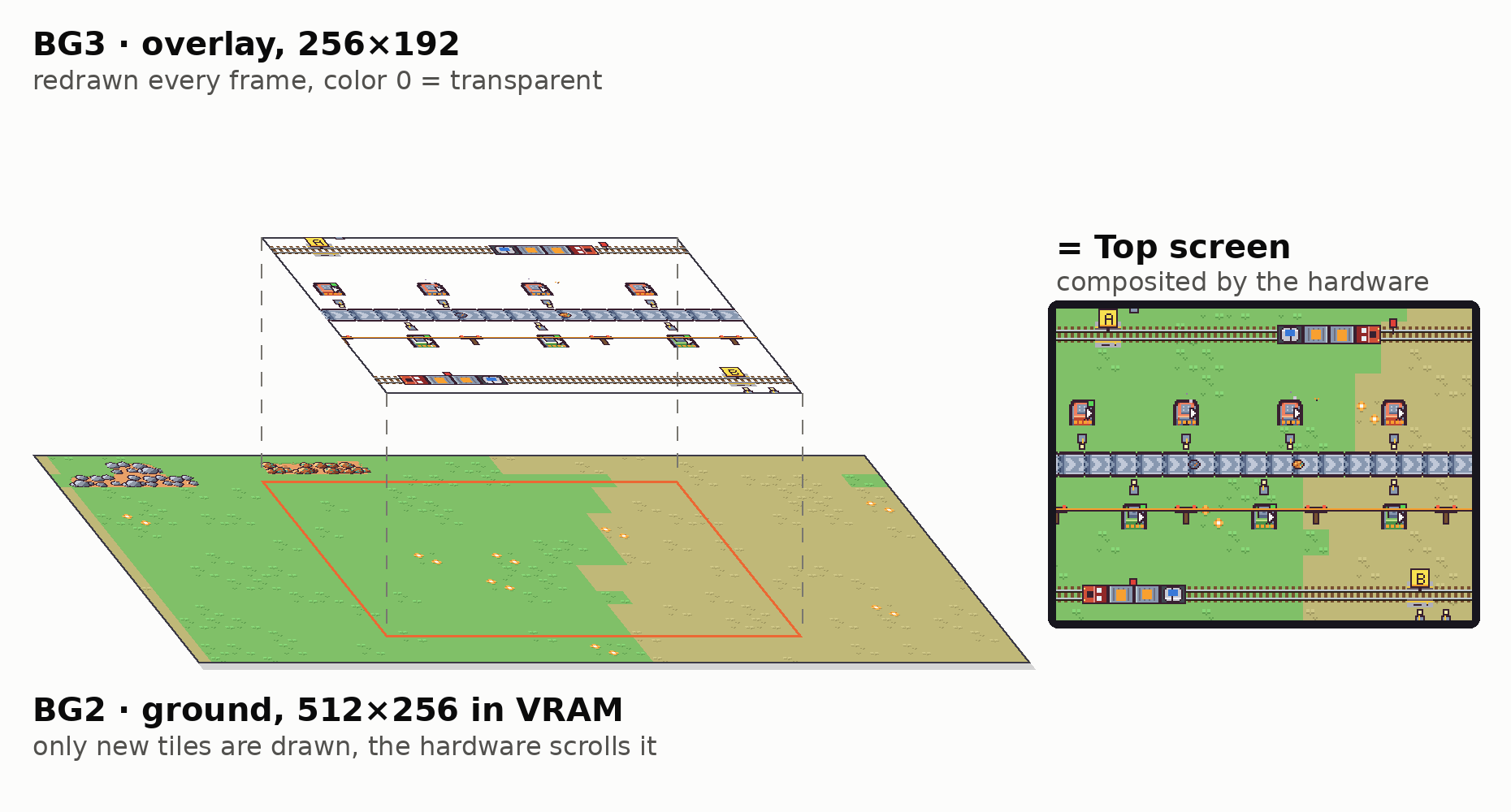
The two real layers of the top screen, pulled out of the game. The ground layer is bigger than the screen, so the tiles around the view are already there when you walk.
Night for free. The game has a day and night cycle, and my first thought was that at dusk I would have to redraw everything darker, including the big ground layer. But each pixel is not really a color, it’s an index in a palette of 256 colors. So night is not drawn at all! When the light changes, the game recomputes the 256 colors of the palette, a bit darker and a bit bluer each time, and the hardware applies them to every pixel of the screen at once. That’s 256 values to write instead of 49,152 pixels. The few colors used by the interface and the cursor are never darkened, so they stay readable at night. The only things actually drawn are the lights: the glow of the lamps and furnaces, and the fireflies.
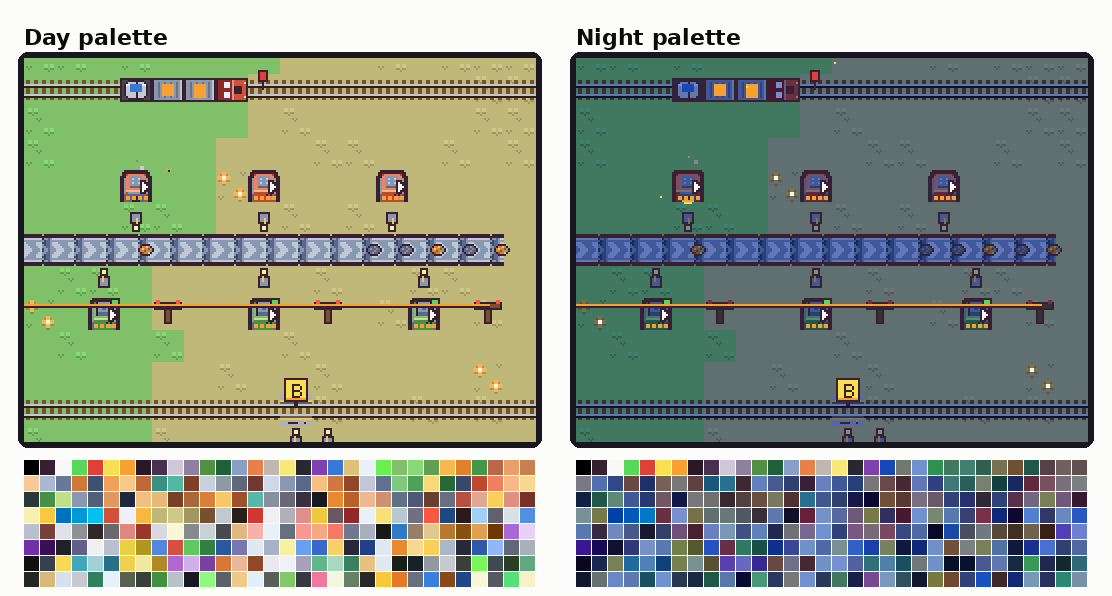
The same frame, rendered once with the day palette and once with the night palette. 97% of the pixels have exactly the same value in both images (the other 3% are the lights), only the colors below change.
Fast memory. The ITCM is 32 KB of memory right next to the CPU, much faster than the main RAM. The hot loops go there: the simulation of the machines, the belts and the drawing of the buildings. 32 KB is not much, so I only put there what runs every frame, and every new feature in one of these loops means checking the size of the .itcm section again (22 KB are used today).
No division. The ARM9 has no division instruction. The DS has a separate division unit, but a plain / in C becomes a slow software routine. When infinite research arrived, it added a harmless-looking time * 20 / (20 + level) per machine and per frame. The benchmark caught it, the number of slow frames in the stress test almost doubled. We replaced it with a multiplication by a precomputed fixed-point factor, and the slow frames went from 581 back to 312.
The interface. Even the bottom screen became a problem when I redesigned the menus (more on that below), a full redraw took 14 ms. The rectangle function was checking every single pixel, and every letter of text went through it. Clipping once and writing whole rows at a time brought it down to 4 ms.
The intro. The splash screen was stuttering too. A nebula was computed pixel by pixel every frame (105 ms!). Computed once at startup, it takes 6 ms.
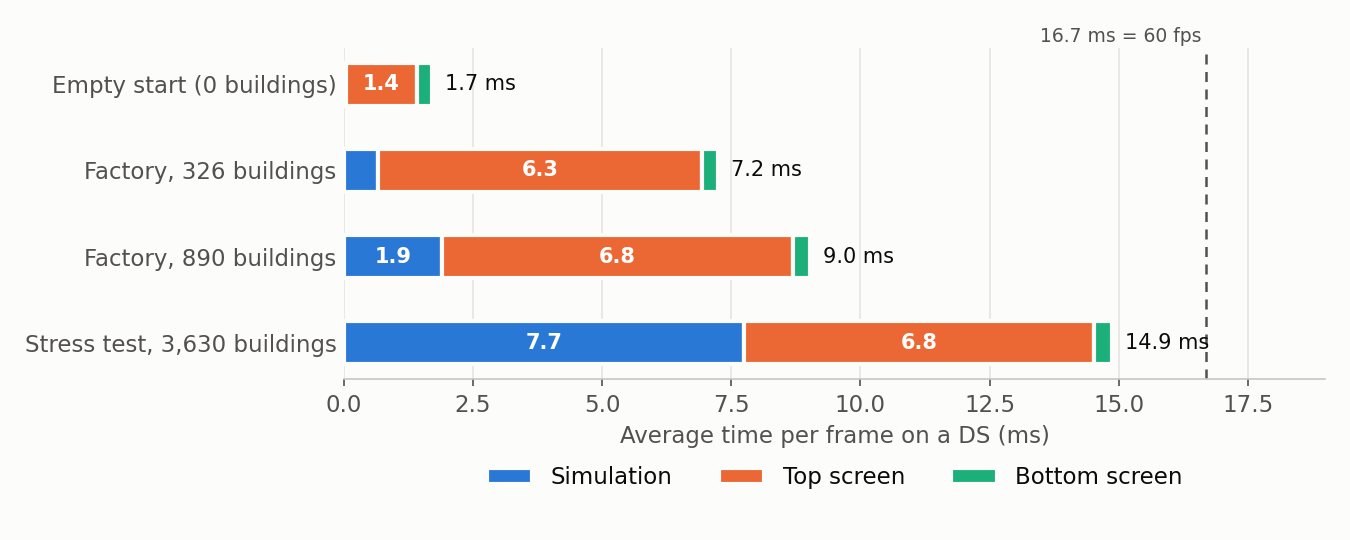
Average time per frame, measured on melonDS with the JIT off. The DS screens refresh at about 60 Hz (59.8 to be exact), so a frame has 16.7 ms. Below that, the game runs at full speed. A lot of 3D DS games actually run at 30 fps, but for a 2D game with belts everywhere I really wanted 60.
On melonDS, a factory of almost 900 buildings runs at a steady 60 fps. The stress test with 3,630 buildings is under 16.7 ms on average, but about 300 of its 1,200 frames are still too slow. That’s way bigger than what you can reasonably build with a d-pad though (and more than what a save can hold anyway).
These are melonDS numbers. The real console is a bit slower, more on that at the end.
Playing it, again and again
Once everything was there, I played. A lot. And every session ended with a list of things I didn’t like, that I sent to Claude, often with a screenshot.
Designing an interface for a d-pad and 256×192 pixels is hard, and the bottom screen was rewritten many times. A selection frame was covering the number of items, two lines of the same description were in two different whites, some texts were too long for their box (they now scroll back and forth)… Removing a building used to need a “remove” tool, which I found painful, so now it’s a long press on B and the tool is gone. And START and SELECT were the other way around compared to most DS games.
Then I went through every screen, one by one, for a complete redesign. The first menus were plain text on a purple background, and every screen got rebuilt with cards, drawn buttons and icons, so you always know which key does what.
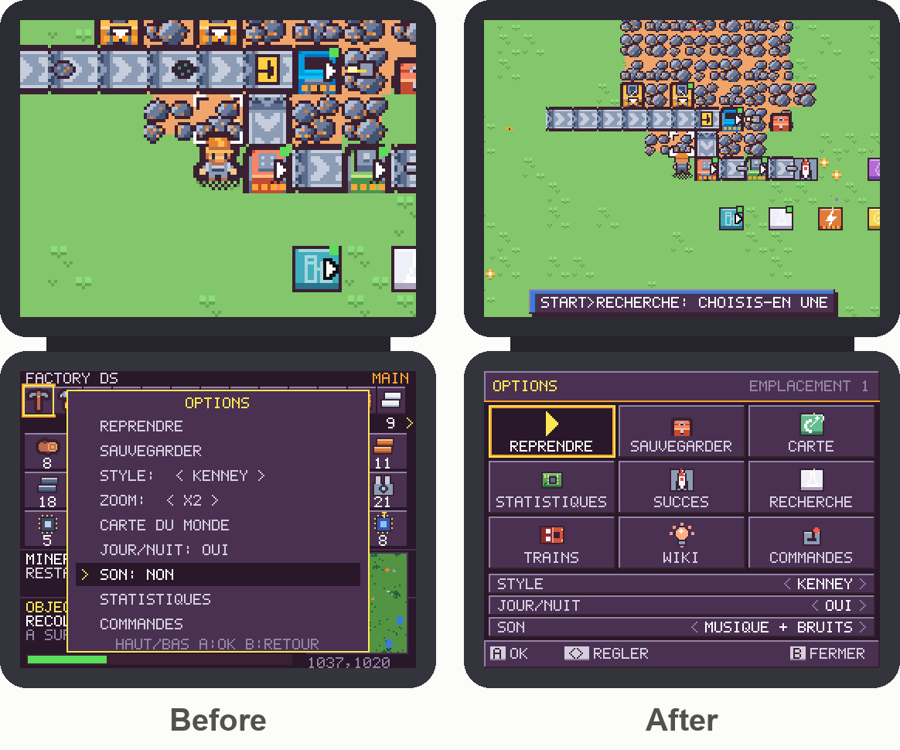
The options menu, before and after the redesign.
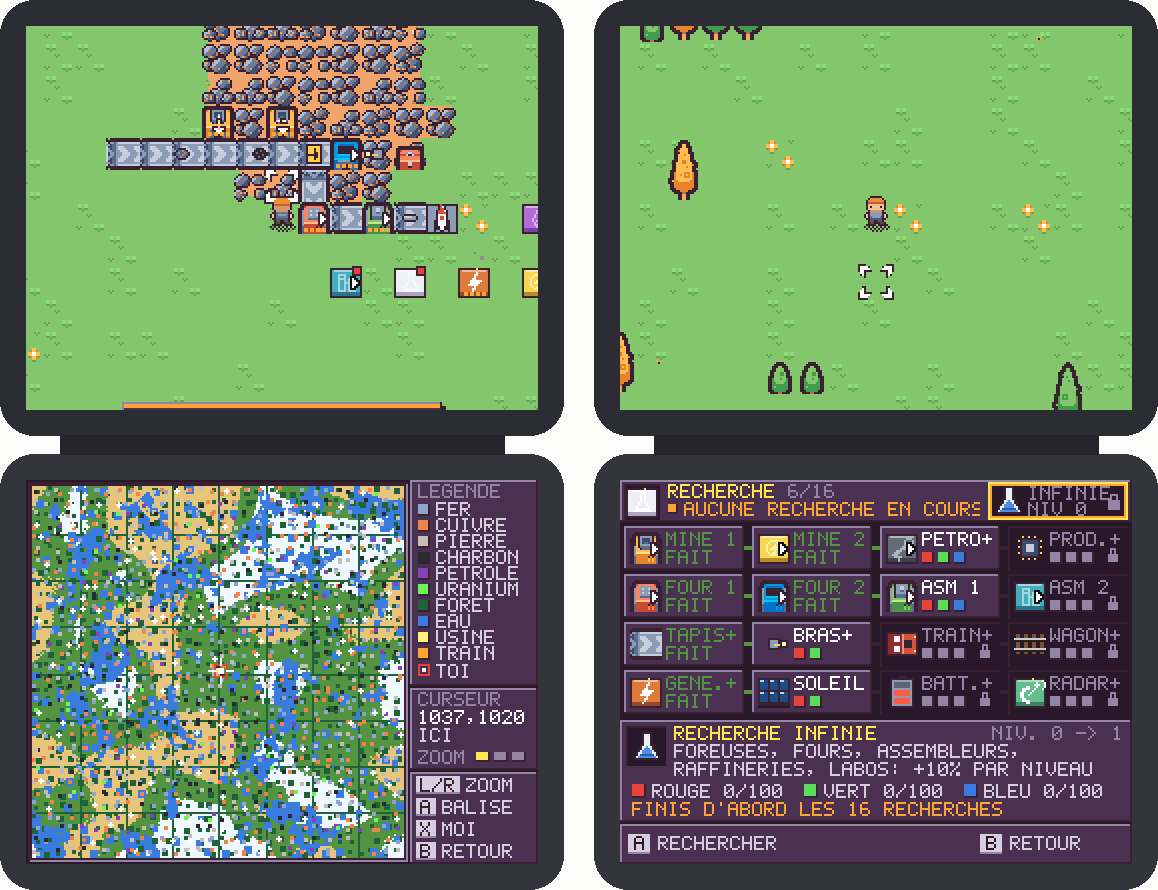
On the left the world map, on the right the research tree, with the infinite research in the top right corner.
The finishing touches
I spent (too much) time on graphic styles. I asked Claude for several palettes and tile variants and kept the ones I liked. The Kenney one stayed the default, and there is also a blueprint style, a flat one and an industrial one, that you can switch at any time from the menu. There was a Game Boy palette too, but I killed it.
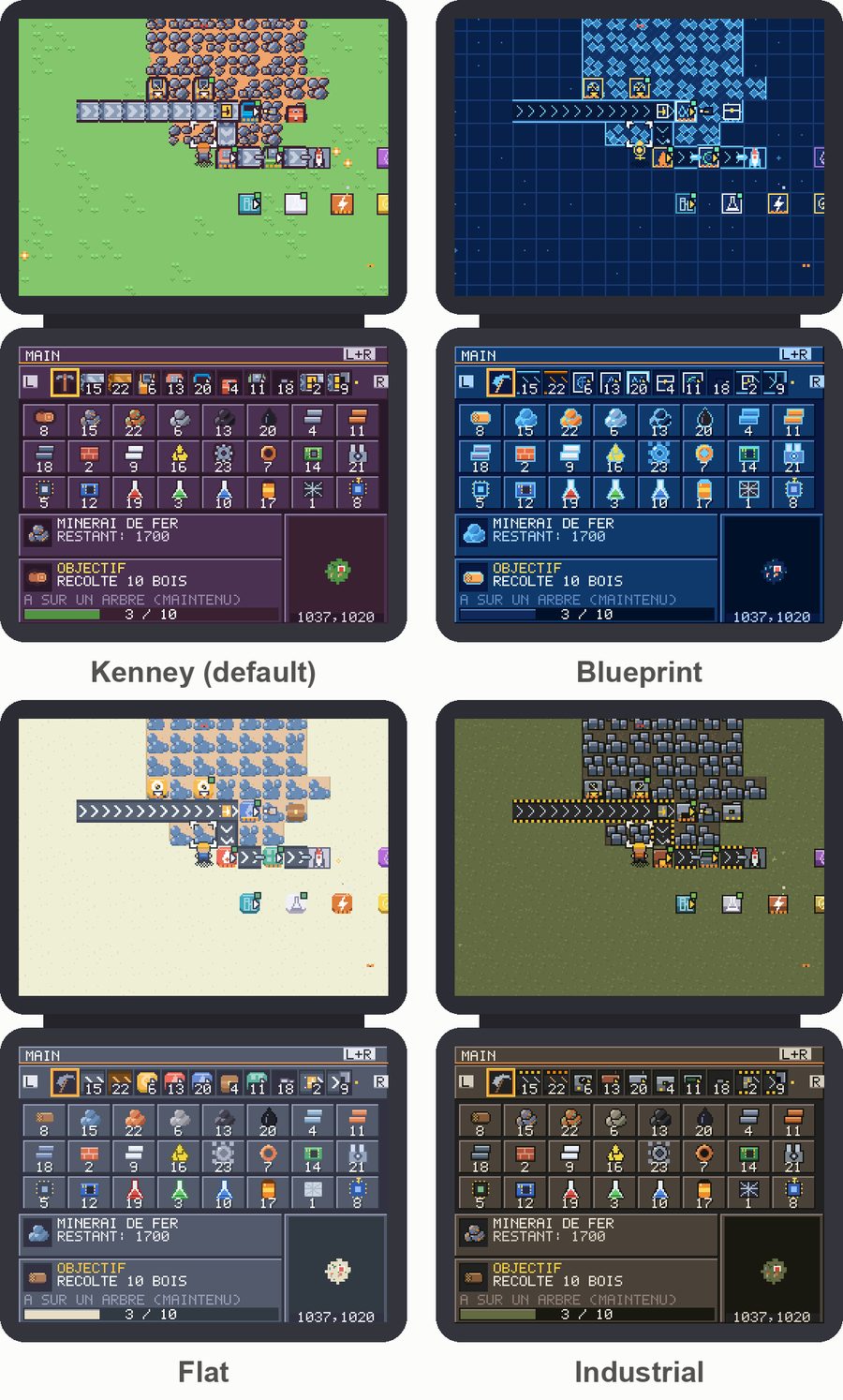
The four styles of the game.
For the sounds, I asked Claude to find a few CC0 candidates on Freesound for each one, and I picked them by ear. Then they were all normalized to the same loudness, because the DS speakers are tiny and some sounds were inaudible next to the music. I also added rain, snow, sand wind in the desert, butterflies and fireflies (there were birds at some point, but they were distracting).
The game was first written in French, so at the end I asked Claude to translate it into English too, around 1,300 texts in total. They had to stay as short as the French ones to fit in the little boxes of the interface. The language follows the setting of your console, and you can switch it at any time from the title screen or the options menu.
And finally a small cinematic when you start a new game. Your ship drifts between the stars, the engine dies, and you wake up in the grass next to it. The first version was very “epic”, with big flashes and shaking, but I wanted something calmer and more dreamy, so we toned it down until I liked it. Everything is drawn with code, there is no video in the ROM.

Next: the real console
You can now play Factory DS from start to finish, from cutting your first tree to launching rockets, and keep going after that. The ROM is under 2 MB.
But there is one thing melonDS didn’t tell me. On my own DS, with a flashcart, the game’s frame counter showed around 30 fps instead of 60, all the time. So I ran the benchmark ROM on the real console, it writes its results to the SD card, and compared them with melonDS line by line.
The real DS is about a third slower than the emulator for this game. The factory of 890 buildings takes 12.2 ms per frame instead of 9.1 ms, and clearing the big buffer of the top screen takes 4 times longer, writing to the main memory is much slower on the real hardware than in melonDS. That’s still under the 16.7 ms of a frame most of the time.
The 30 fps came from somewhere else, and it’s a bit funny. The frame counter is shown in the statistics screen, and this screen was fully redrawn on every frame. On the real console that alone took almost 16 ms, so as soon as you opened the statistics, the game dropped to 30 fps… and showed you 30 fps. The screen now refreshes 8 times per second and the counter shows the real speed. Small and medium factories run at 60 fps on the real console, and only very big ones slow down a bit.
There is still some margin to win on the real hardware, starting with that buffer that is cleared on every frame, and I’ll probably write a second part about it. In the meantime you can already try the game on your own DS or in melonDS. And maybe one day I’ll try local wireless multiplayer, with two DS building the same factory!
Download Factory DS (factory-ds.nds, 1.9 MB, in English and French). It runs on a real DS with a flashcart, or in an emulator like melonDS.