
Arduino as a PIC Programmer
20 February 2012
Burning Microchip PICs from USB with an Arduino Uno, a resistor and a 12V supply
Updates
- [3 March 2012] New version of the C# program and of the Arduino firmware, it now works with many 16F PICs.
- [May 2012] Other people built on it : a version for the PIC18F family and a programmer for PIC32. Each PIC family has its own programming protocol and I am a student with a lot of homework, so I can’t maintain it anymore.
- [2016] More than 20,000 downloads !
- [2020] Eight years later, people are still posting their PIC references in the forum thread, hoping theirs is supported.
PIC microcontrollers are everywhere, but programming them needs a dedicated programmer. The cheap ones use a serial or parallel port that no modern computer has anymore, and the USB ones are expensive. I had an Arduino, so I wondered : why not make it do the job ?
The circuit
A PIC is programmed through ICSP (In-Circuit Serial Programming) : a clock line, a data line, and 12V on the MCLR pin to put the chip in programming mode. The Arduino handles the clock and data, and the 12V comes from an external supply.
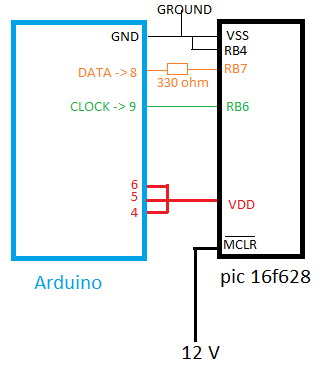
That’s all : pin 8 is the data line through a 330 Ω resistor, pin 9 the clock, and pins 4, 5 and 6 are tied together to power the PIC. I used a PIC 16F628, but it should work with most 16F PICs. One safety rule : always reset the Arduino before putting the 12V.
The firmware
The Arduino sketch bit-bangs the ICSP protocol described in the Microchip datasheets : a 6 bit command, then a 16 bit word for the data (a start bit, 14 bits of data and a stop bit). On the USB side it accepts simple one letter commands on the serial port :
s : start in High Voltage Programming mode (S for Low Voltage)
wXXXXXXXXXXXXXX : write a word at the location pointed by the program counter
i : increment the program counter
r : read the current location
e : erase the full program memory
R : reset the PIC (program counter back to 0)
Every command answers D when it is done.
The software
Typing words one by one in the serial monitor gets old fast, so I wrote a small C# program for Windows. It reads a .hex file, sends it word by word to the Arduino, writes the configuration word, and can read the program memory back to check it.
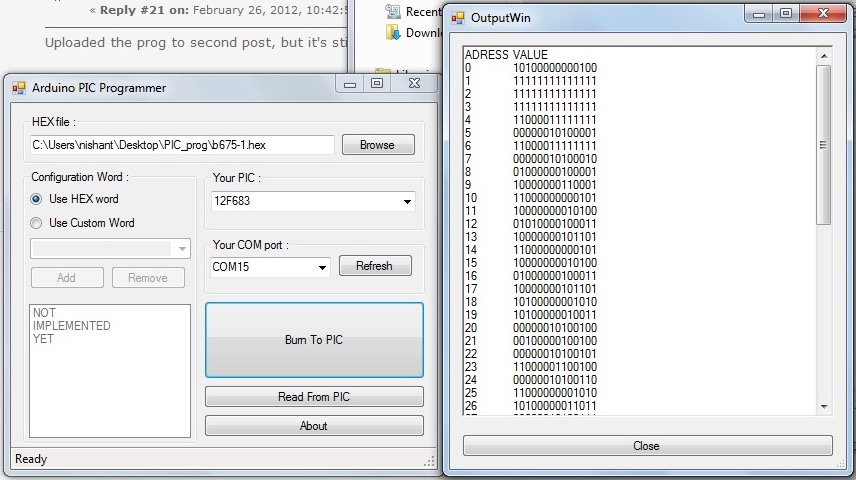 Screenshot : Nishant_Sood, the first one to try it on the forum
It’s still a first version, so check your PIC with a regular programmer if you can. The code, the C# program and the list of tested PICs are on the Arduino forum : if you try it with another PIC, tell me there so I can add it to the list !